


How This Site Was Made
Static site builder Astro was a great testbed for learning about building with Claude and Cursor.
With the tremendous acceleration that’s happening with technology, I wanted to have a public place to think aloud and see what patterns show up. I knew I didn’t want to use a readymade blog theme. I wanted to have the ability to experiment with richer forms of storytelling and visual explanation.
I thought that this might be a good opportunity to better understand whether I could get something useful by building with AI coding assistance. I wasn’t interested in attempting to one-shot a blog into existence; I wanted to see if I could build the site up in a way that would help me explore what the best ways to work with AI.
Here’s what I did.
Setup
1. Explore Claude
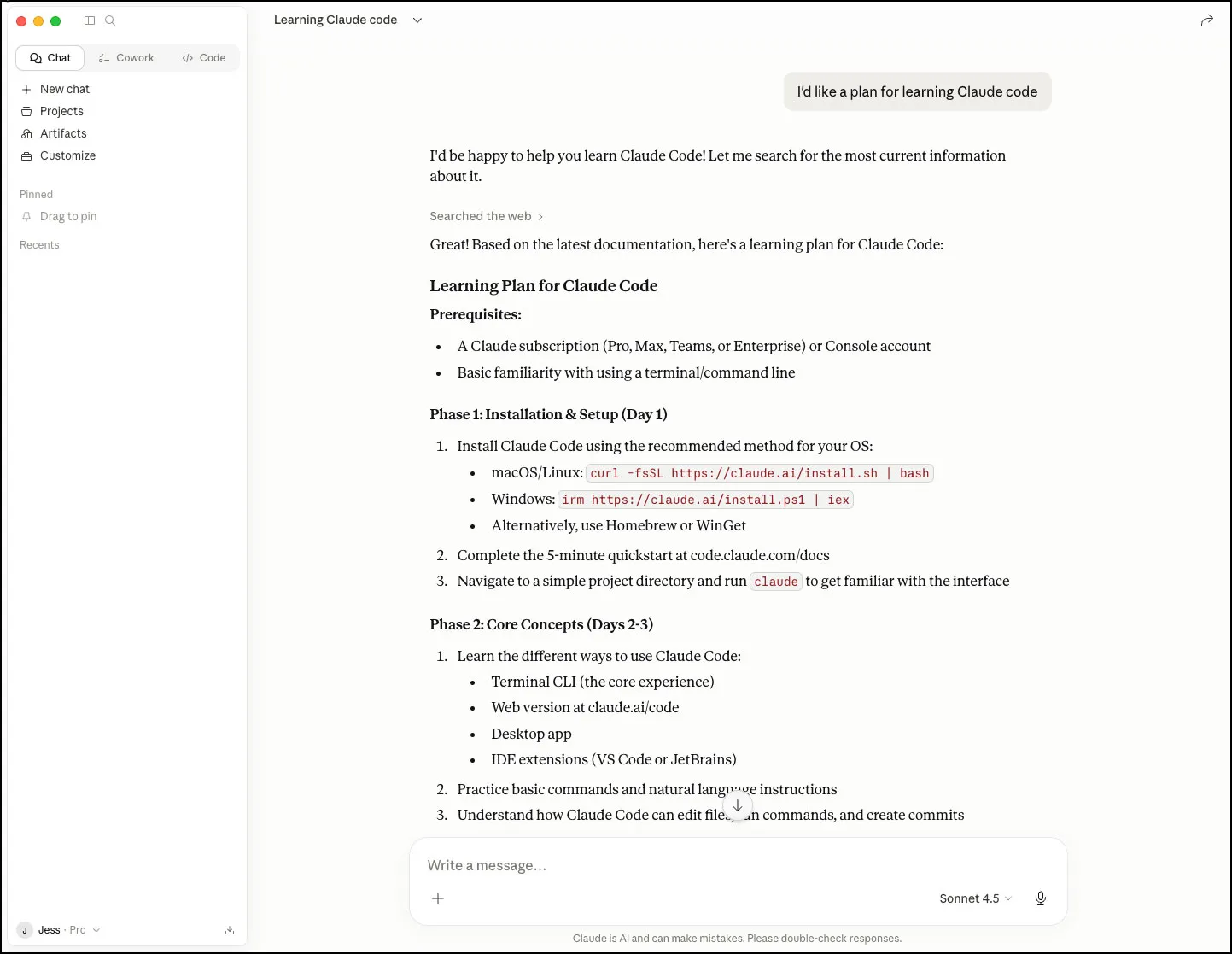
I started by setting up and exploring Anthropic’s Claude. There’s a great deal of delight and personality that’s carried entirely through textual experiences. This feels appropriate for a technology that’s been fed and trained on textual information. Answers to my questions were concise, readable, and organized. Far easier to digest than search results.
2. Choose a static site generator
Prior to this project, I had narrowed my technology choices down to two: Hugo and Astro. Both seemed like they could be good candidates and had enough of the basics in place to get up and running. A quick consultation with Claude helped cement my decision. Astro was well-documented and build with the stuff of the web – Node.js, Javascript, HTML, CSS, while Hugo was built on Go, which is a much less commonly used language. Based on Claude’s rationale, I concluded that I’d have a greater chance of being successful building with Astro.
3. Get a basic blog working

I suspected that if I were going to have the greatest chance of being successful coding with AI, I would need to understand how Astro worked and how it was organized. I also wanted to get a feel for what it was like to develop an Astro site manually. Astro’s tutorial that takes you from install through to building up a working blog from scratch. In short order I had a basic working blog with only a minimum of CSS, perfect for tinkering.
4. Determine proof-of-concept scope
Now that I had a basic working blog built with Astro, I needed to understand whether it could be made to support the kinds of content I was hoping to generate. Here’s the short list of enhancements I wanted to prototype out to verify that Astro could be made to fit my needs.
| 1 | Support essays for long-form writing, and notes for less formal writing. |
| 2 | Essays would have hero images while notes would just be plain text. |
| 3 | Home page would need to feature essays and notes. |
| 4 | Essay summaries display a thumbnail image, title, description, date. |
| 5 | Notes summaries display title, description and date. |
| 6 | Dedicated list pages for essays and notes. |
| 7 | Topic list pages that include essays and notes. |
I felt that this would be enough scope for me to determine whether Astro could be modified enough to support my needs. I also felt that the scope was complicated enough that it would help me understand whether Claude and AI were capable enough for me to use to build out the site in detail.
5. Build POC with Claude
I took notes during the first week of my experience building with Claude.
2/4 Worked with Claude to understand what would be needed to add a additional content types to the blog, add them to navigation, add images, create a home page that could show both together. Changed the routing of the pages working the way I wanted.
2/5 I got Claude installed and set up. Got Claude set up in VS code. Looking forward to getting this working on the blog. I think I’ll need to do this in short bites. Also asked Claude on a refresher for the terminal. Impressive.
2/6 One of the things I’m most surprised about is how normal this feels – much like the experience of sitting within a Waymo. It’s as if the brain can’t quite handle this new tech. The other thing that occurs to me is that Claude shows just how limited vanilla search is for organizing and presenting the world’s information. I think that I’m going to have an easier time coping with this if I treat it as a new medium, rather than assuming that it’s just an extension of what I’ve already been working on.
2/7 Asked Claude to help me understand a javascript method in the astro tutorial I’m working on. Totally worked! Explanation was clear. I’m really digging Astro so far. Much easier to pick up than Hugo, and better documented too. I have a long way yet to go, but I can already tell it’s going to be great once I have the basics in place.
Had a hugely successful day today. I have a basic Astro site up and running, configured visual studio code got source control working, Asked Claude some questions about the code, got some good clarifying answers. It’s like having an experienced software developer sitting next to me. Tomorrow I’m hoping to finish up the tutorial and start figuring out the structures I need to have in place.
2/8 Astro is really powerful. I’m learning how to construct nested repeatable components in the blog that can iterate through a set of values. Astro seems to like nesting styles in a component – I’m not sure whether this will be good practice in the long run. We’ll see. Just had Claude make the first change to the code. It worked!
I asked Claude how to include the description from blog post shortmatter. It showed me how - tried it out and it was right. Just saved me an hour of looking and futzing. Just asked Claude to add the rss feed to the footer. it worked. I’m going to go so much faster than I would otherwise. Holy shit.
I didn’t like the routing of the posts in that they looked like usecraft.com/posts/post-1, etc. I was able to get Claude to flatten the URLs to look like this usecraft.com/post-1. The work wasn’t complete - it missed the tags page. I was able to ask it to do the same for tags and then it did. Crazy that I can ask for this, it’ll traverse the site and then make the changes. It’s fascinating that I can ask for things and get the results I want.
I had an exchange where I could add entirely new content types to the site - notes. It involved a great number of structural changes, made great suggestions, and asked for additional information. This feels like flying to me. I don’t think the world will ever be the same. I’m really enjoying working on building up the blog incrementally - feels like the right pace for me right now. I think that I’m going to get all of the content solid as bare bones as possible before switching over to building out the CSS.
2/9 I’ve hit my Claude daily limit. Felt like my battery just ran down. I can’t quite tell how much I can trust Claude quite yet, so I’m still looking at the changes it’s making. I ran into an issue where Claude made a change that didn’t entirely work. I was able to paste the error trace in and it was able to resolve the problem. Bonkers. I now have the skeleton of the site working. All the basic dynamic elements needed to build out the blog are working.
My plan now is going to be designing the site in Figma. I need to figure out how the site needs to be structured and described so that Claude can start the process of building through Figma MCP.
After the first week, I had a skeleton of the site built, had verified that Astro could be customized in the ways I wanted, and my confidence in working with Claude was solidifying. What became increasingly clear to me by this point is that if it’s possible to make whatever software you want, then figuring out exactly what you want to make becomes the the problem to solve. I put Claude aside to move over to Figma to get crisp on what I wanted.
Design
Now that I knew the functional scope I wanted was possible, I needed to lay out each page type across the major responsive form factors required for arranging text and images. In anticipation of pumping the design directly through Figma MCP to Claude, I thought if I took extra care in setting up variables and components with responsive auto layouts in Figma, it might make the job of styling the site go faster by increasing the fidelity that Claude generates by default.
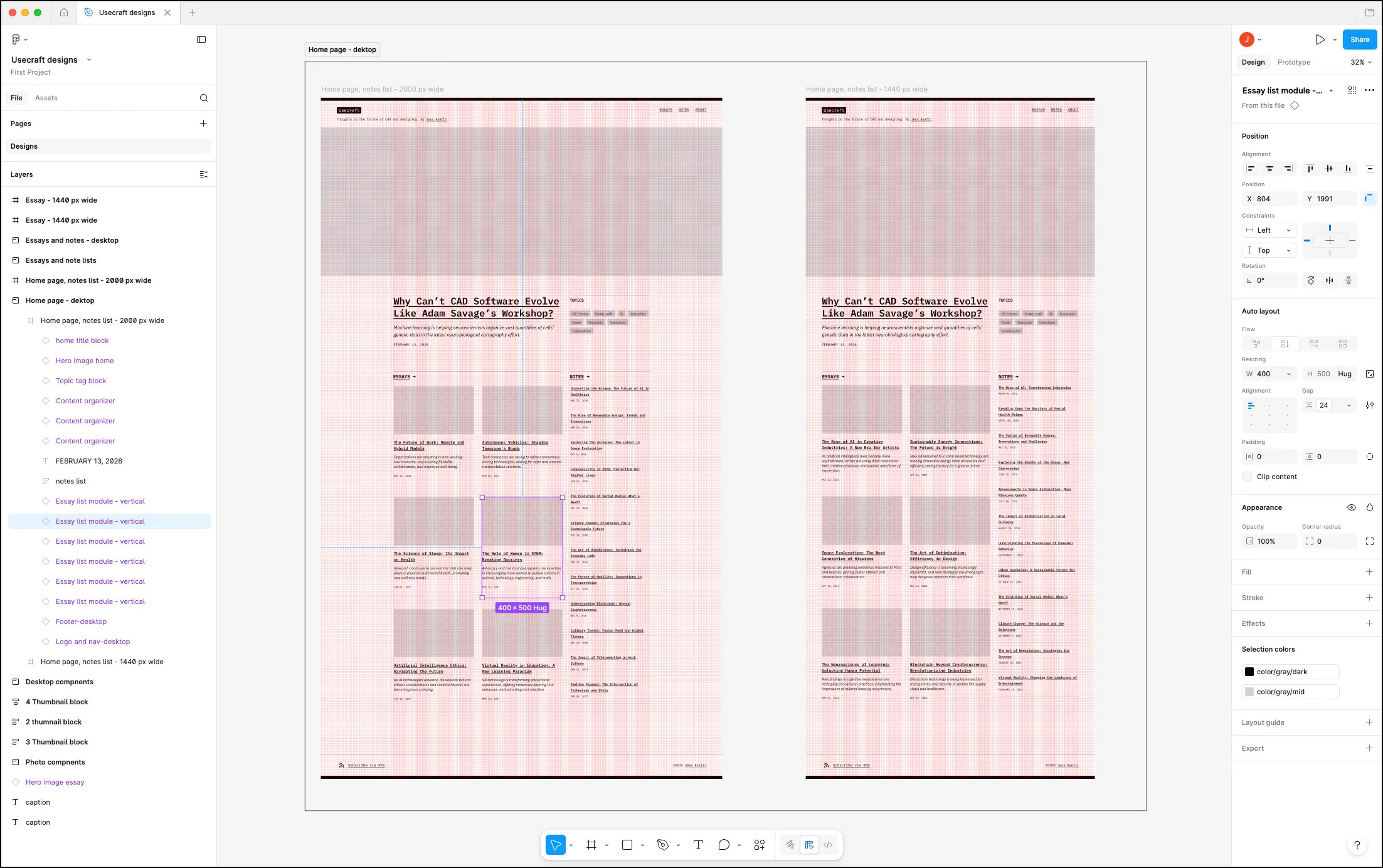
I find Figma’s handling of component auto layouts to be frustrating. The rules Figma uses for auto-layout don’t entirely correspond to the way that web browsers handle this through CSS, so the experience of building these kinds of designs out in Figma feels fiddly.
I did a few experiments to see if I could make Claude ingest the design via Figma MCP and map them to the working Astro stub, but the results were brittle and unsatisfying. Once it became clear that I’d see diminishing returns for detailing every responsive edge case in Figma, I decided to see if I could do it directly in code.
Build the site
1. Switch to Cursor
Given how my Claude/Figma MCP experimentation went it was clear that I wanted to have more control over the translation from design to working code. I knew that I’d need to work incementally and I wanted to be able to point directly at the elements I wanted to change, just as I would if I were working with a front-end developer.
Given this, I decided to switch from Claude to Cursor. Cursor integrates a web browser with useful pointing and inspection tools, making it very easy to point to a feature or a code snippet. You can select an item, see the styles and values that govern its appearance and position, and then tell Cursor how you want it to change. This makes it very easy to tweak the design while also avoiding the ambiguity that would happen if you had to just use words to describe what change you wanted.

2. Working with Cursor
This site was built incrementally, one constrained improvement at a time. Here’s the basic proces that worked for me:
| Step | Mode | Note |
|---|---|---|
| 1 | Ask mode | Ask what would be involved in making a change I have in mind. Point directly at the thing to change in the browser or file list. Add screenshots if needed. |
| 2 | Ask mode | Ask for options along with pros and cons. Continue asking questions until I’m confident I understand what was at stake. |
| 3 | Plan mode | Ask to make a plan based on the conversation. |
| 4 | Plan mode | Add any additional adjustments and clarifications to the plan. |
| 5 | Agent mode | Build the plan. |
| 6 | Agent mode | Review the results. Make additional manual adjustments and tweaks with the inspector, or in the code. |
| 7 | Agent mode | Follow up with additional related enhancements until feature is complete. |
| 8 | Git | Commit changes. |
3. Building techniques
Starting with enough context
When starting a new agent session, it was helpful to initiate a conversation by asking it to explain to me how a particular feature of the site was constructed. This allowed me to see what language Cursor was using and gave me the confidence that it would be able to make the changes I wanted.
Using screenshots
I’d often supplement written asks with screenshots to describe the changes I wanted. These seemed to work as well, if not better than linking to Figma components via MCP. When using screenshots I found that Cursor would base the styling more on what had already been built, rather than attempting to use all of the properties from FIgma.
Making structural changes
One of the most surprising things about coding with the help of AI is that the cost of making global, structural changes goes way down. Decades of working in software have conditioned me to try to get the structural stuff sorted up front, but at least for this project, it was actually advantageous for me to defer these kinds of decisions until they really needed to be taken care of. It makes me wonder about how many times a software project has been derailed or compromised because of architectural decisions that can’t be easily undone as a project progresses.
Content stubbing
Stubbing out as many pages as needed to test the layout of list pages was trivially easy – “Make 10 duplicates of this essay page, add a random hero image, tags, and four paragraphs of content” is all that was required. Huge timesaver.
Using Claude to describe a feature
For more involved features, like the mobile navigation or sticky navbar, I found it helpful to ask Claude how these things are usually structured, and what the rules were for their behavior. I was able to take this into Cursor and turn it into a plan for Cursor. It’s interesting that the output of one model can be used as clear instructions for another.
Building semantic based tooling
As the project progressed and I started to turn my attention to refining the responsiveness of each page type, I decided I wanted a debugger overlay that would show which breakpoint was being show, the dimensional range of the breakpoint, and the current screen width.

This saved me a ton of time and guesswork, and had the added benefit of making it so that I could refer to a specific breakpoint with plain English. The ability to quickly whip up a tool to aid in the building of an application is very powerful – as is building a kind of semantic framework by which you can converse with the AI is also helpful.
Dealing with incremental debt
I did have to do a cleanup phase before fine-tuning the visual styles. When attempting to make changes, there would often either be shared styles between elements that shouldn’t have been connected, or multiple elements that should have shared the same style but didn’t. Since structural changes are trivial with AI, it was very easy for me to go through the site, select a set of elements and ask Cursor to have them share the same style.
Building and learning with momentum
The speed at which I was able to add features relative to the time it would have taken me manually was remarkable. By working a piece at a time, and asking Cursor what would be involved in making changes, I was also able to gain a much deeper understanding about how Astro works, while also understanding how Cursor works.
Results
I have a custom blog I can continue to evolve.
Over the course of about 3 weeks of intermittent work, I was able to build a blog that will allow me to explore ideas and tell visual stories. I don’t have to contort around a stock blog template. I’ve created custom components that are easy to insert into the pages with a minimum of code. This makes it possible for me to create stories that are editorially richer in a way that would otherwise have been prohibitively expensive. As my needs evolve, I’ll be able to continue to modify the site.
Large number of customizations in a very short timeframe.
I’m shocked just how far I was able to travel in a very short amount of time. The following enhancements were added one at a time over the course of over 300 git commits.
| CUSTOM CONTENT TYPES |
| • Essays for long-form writing. |
| • Notes for shorter, less thorough ideas. |
| • Hero and thumbnail images for essays. |
| • Essay summary cards that include thumbnail, title, subtitle. |
| EDITORIAL ENHANCEMENTS |
| • Hero treatment for most recent essay on home page. |
| • Dropcap type styling for essays. |
| • Customized date format. |
| • Ability to flag post as draft. |
| CUSTOM LIST PAGES |
| • Home page displays the most recent essays and notes. |
| • Grid layout for essay list. |
| • Topic list page that displays essays and notes. |
| CUSTOM STYLING |
| • Custom look and feel. |
| • Custom web fonts. |
| • Styleguide page that contains all the different elements on a page. |
| RESPONSIVE LAYOUT |
| • Responsive layouts and text handling for all page types. |
| • Custom debugger overlay with responsive breakpoint dimensions. |
| NAVIGATION ENHANCEMENTS |
| • Mobile nav. |
| • Next/previous navigation for essays and notes. |
| • Streamlined routing for cleaner URLs. |
| • Sticky navbar that appears when users scroll up the page. |
| CUSTOM COMPONENTS |
| • Switched to MDX format to enable embedding custom components. |
| • Created a wide range of image and caption components. |
| • Table components for easy in-page formatting. |
| • Embed components for Youtube, Bluesky, Mastodon, Sketchfab. |
| • Footnotes component. |
| • References component. |
| • Custom RSS page. |
My thinking on working with AI has shifted significantly.
As a designer, being able to work with code more easily that working with pictures has been a profound experience. I’ve had to recalibrate what I thought was possible. I’m still digesting what the implications will be for designers and the software industry, but I can’t see how the software world is going to ever go back to its original shape. Thankfully I now have this nifty blog to work through my thoughts.
Takeaways
This project was amazing way to learn about building with AI
This project was an amazing way to learn about building with Claude and Cursor. The project was well-bounded. I knew what I wanted in the end. I wasn’t asking for magic. I encountered very few roadblocks along the way. The ones I did encounter taught me something useful about working with AI. The general sense of momentum was unlike any software project I’ve worked on in 25 years.
Astro was the perfect testbed
I chose a good project to start with. Astro as a technology is very well structured and made of the stuff that AIs have been trained on. Starting with a working stub of the blog gave me a baseline from which to operate, so if a change was made that broke Astro or negatively impacted the blog, I knew it instantly and could correct. Astro is especially good at providing error messages and stack traces, which can be copied and pasted in to debug mode to resove. Worked every time.
Having a coding background was helpful
My familiarity with coding and HTML shaped my approach to this project and helped me know what to ask for. I’ve always believed that knowing how to build websites should be required for web designers. I’m even more certain of this now than I was before,
Clarity in thinking = clarity in language
I was surprised by just how much forgiveness there was in Claude and Cursor’s ability to understand what I was asking for. With this said, the clearer I was with my language, the more objects I pointed to, the more code I referenced in my requests, the better the results I got.
AI is self-documenting
It’s fascinating to experience AI as a self-documenting vehicle for building a thing. If there’s a thing you don’t know how to do, or don’t understand, you can ask and get answers that allow you to move on to the next step. You can even ask the models how they would prefer a request to be structured. Extraordinary.
Structural changes were trivial
So much of designing software is based on the understanding that structural changes are things to avoid if at all possible. Making changes across the application was trivial and almost always worked. This has profound implications for how software is designed and built. I found I had to recalibrate my thinking, which turned out to be more of a challenge than I had expected.
Incremental building helped me avoid cognitive debt
Working incrementally ensured that the complexity of the project never outpaced my understanding of how it worked, and how Cursor worked. I can imagine cognitive debt accruing at a frightening pace when attempting to one-shot a complex project.
Asking for discrete changes worked better
I found that when I attempted to ask for too much at once, Cursor ran into issues and the resulting work was hard to troubleshoot. Also, the more complex the feature, the greater the burden placed on being able to be specific and descriptive enough. I think because I was learning so many things at once that the size and complexity of what I could reasonably describe was limited. I anticipate that the more comfortable I am with AI, the more complex of a capability I’ll be able to tackle.
What were the biggest surprises?
- I gave up zero control over the final form of the site. If anything, I had more control.
- I had to recalibrate what I thought was possible, especially where systematic changes are concerned.
- The cost of making systematic changes that touch many parts is almost zero. That’s new.
- Designing directly on the thing I was making was better, faster, more immediate and more flexible than working in Figma - especially when dealing with responsive behaviors.
- I was the limiting reagent in terms of how quickly I could have built the site with Cursor and Claude. I’ve always been significantly faster than the software organizations I’ve worked for. That’s new.
- Near as I can tell, working with AI in the context of coding an application was hallucination-free.
- This feels like a new medium, much as the web was more than 30 years ago. While many skills designing for web and mobile are transferrable, it feels like entirely new skills and ways of thinking will be required.
What’s been lost?
Marshall McLuhan observed “Every augmentation is an amputation”. Early in my career when I built websites, I took great care in their construction, and figuring out how to make the software do what I wanted was a thrill. I took great pride in the craft and construction of my code. I don’t feel the same level of pride or ownership in construction here, and I miss it.
This makes me think about all of the extremely talented and creative front-end developers I’ve worked with and counted as friends. I know that their work contributed to the pattern-matching systems that I used to build this site. I worry for them and what this technology may mean for their livelihoods in the future. No easy answers here.
Closing thoughts
Back in 1986 when I was a teenager, Star Trek IV: The Voyage Home hit the theaters. In the film, the crew of the Enterprise has to travel back in time from the year 2286 back to 1986 to fetch a pair of humpback whales and bring them 200 years into the future in order to save humanity. While in 1986, the crew have to secure some plexiglass to build a holding tank so they can transport the whales in their spaceship.
During this scene, shown below, Montgomery Scott bribes the plexiglass manufacturer with the formula for transparent aluminum. He attempts to talk to the computer because the computers of 2286 can understand the spoken word.
I grew up in a world where speaking to computers was science fiction. I just spent the last month conjuring software just by asking for what I wanted. It’s hard to overstate how profound it is to discover that we’re living in a future that’s hundreds of years closer than it was when I was growing up.
More Reading
CAD's Next Shift
Computer aided design has a history of moving towards more capable substrates. How will CAD evolve next?
APR 5, 2026