
Personal Software
Building a single-purose application with Claude makes me wonder whether we're about to enter the age of personal software.
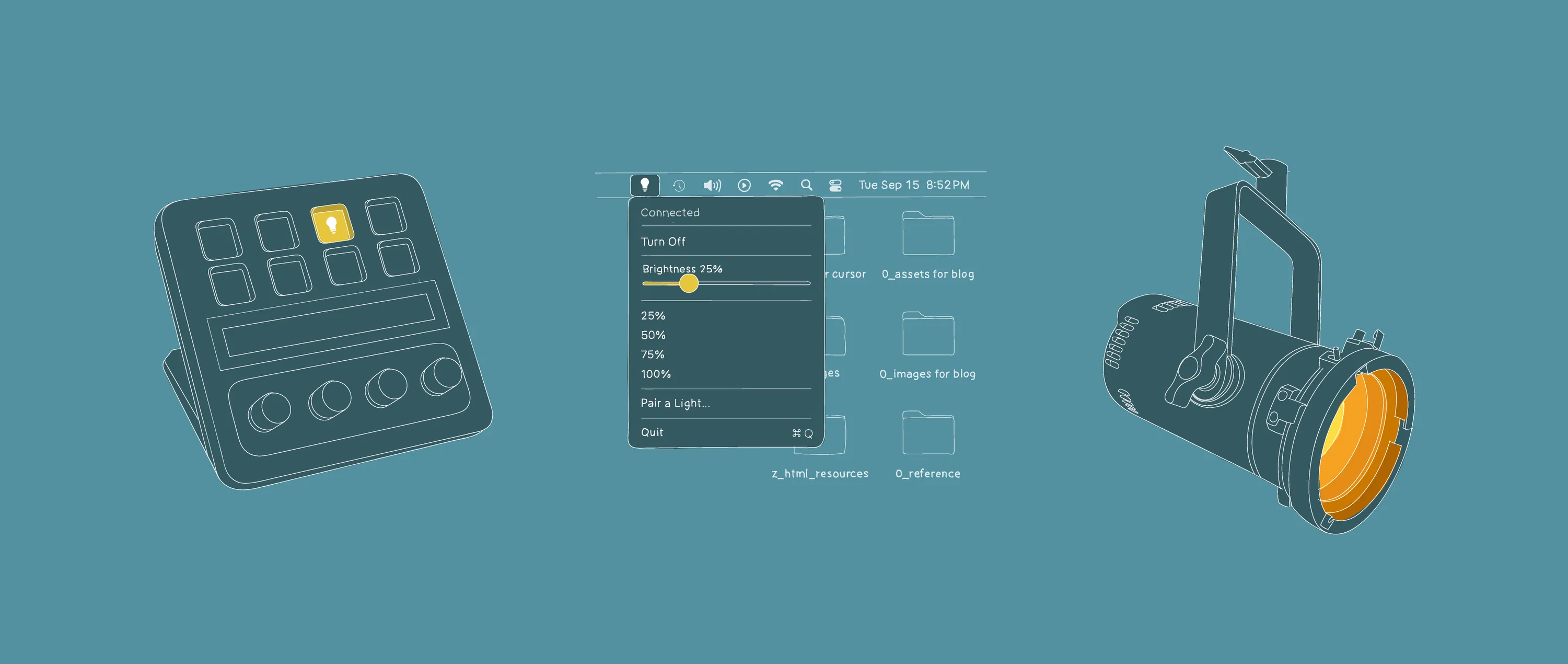
I have a bluetooth-enabled LED light that I’ve wanted to use to illuminate my background when I’m on a Zoom call. Turning it on through the manufacturer’s software has always been an exercise in frustration. The software is heavy, visually noisy, full of features I’ll never use, and takes up valuable compute resources while it’s running. It feels like an awful lot of software to run when all I really want is the equivalent of a remote light switch with a dimmer.
I thought I’d see if I could work with Claude to create a tiny single-purpose Mac application that could connect to the light, turn it on, set the intensity, and turn it off when the application is closed. My goal was to be able to control this app through an Elgato Streamdeck, a nifty peripheral made for video streamers that enables people to assign different actions to physical buttons with built in LCD displays.
1. Research
Claude affirmed the problem had been solved before. Provided I was willing to forego managing the light with the manufacturer’s application, pairing the light via Bluetooth would be straighforward. The only specialized knowledge required to be able to talk to the light was to know what Bluetooth opcode commands the light fixture would understand. Claude’s familiarity with Github supplied the required info.
2. Build the App
Building the application was very straightforward. When making software, I prefer to build up incrementally rather than bite off too much scope.
- Install latest Xcode.
- Connect to the light.
- Turn light on.
- Turn light off.
- Set the intensity.
- Create a simple toolbar application menu.
- Add connection status and ability to turn on and off.
- Add an intensity slider and intensity presets.
3. Refine the App
Once the basics were in place it was time to refine.
- Keep the bluetooth connection active for 2 minutes to make the slider more responsive and disconnect if no activity.
- Reconnect when application menu is activated again.
- Turn the light on when the application is launched.
- Turn the light off when the application is closed.
- Have the application remember and load the last set level of intensity so the UI reflects the light’s current output.
4. Create Pairing Workflow
The most tedious part of the process was in figuring out the Bluetooth pairing workflow. This involved a number of iterations resetting Bluetooth on the light fixture, power cycling the light, and establishing a new handshake connection.
5. Connect to Streamdeck
Once the app was built and running, it was trivial to hook it up to the Streamdeck using a standard multi-action control: One Streamdeck press opens the application, connects to the light, turns the light on to whatever intensity level it was last set. Holding the same button down for a second turns the light off and closes the application. I originally intended to create a Streamdeck plug-in for this application to control the intensity of the light with one of the Streamdeck’s rotary encoders, but this felt overkill for what’s essentially a set-it-and-forget-it operation.
6. Almost no UI at all
The UI of this application really isn’t anything to write home about; it’s functional, does just what I need it to do and nothing extra. I spent zero effort to gussy it up. I left the generic lightbulb icon Claude inserted in the toolbar and I like that it changes the icon’s appearance depending on whether the light is on or off. Leaving this as-is feels appropriate given how little I actually want to think about this software when I’m using it.
Are we entering the age of personal software?
I’ll freely admit that it’s more than a little ironic to use one of the most complex pieces of software humanity has ever made to make one of the dumber pieces of software humanity has ever made. But it’s also cool that this is possible.
This tiny project has made me think about just how many “I wish…” moments I encounter each day interacting with my computer – the things I would change or make if I had the ability to do so. When the cost of addressing these issues is high (either because we can’t easily reach the makers of the software, or we can’t configure how an application functions), then most of these wishes never reach the point of activation. Assuming LLMs continue to become easier to use and the cost of making software continues to go down, I think there’s a possibility of turning these kinds of wishes into new software capabilities.
The thing I like the most about this project is that it resulted in less software. It’s an act of subtraction. This makes me wonder whether there might be more opportunities to subtract and simplify.
I’ve been a professional software user for more than a quarter century and even the applications I love the most are stuffed full of capabilities I’ll never use. A great deal of my proficiency with these tools rests on my ability to efficiently narrow-slice just through the parts I need to do my job. I’ve learned hotkey combinations and have customized application workspaces within the limits of what they will allow, and I’ve trained myself to no longer pay attention to the features I never use.
What would happen if we had the ability to subtract from the applications we use the most? How much more efficient could we be? How much more focused? Surely all the features we don’t use must add some nonzero amount of cognitive drag. There’s a part of me that wonders whether we’ll get to the point where it might even be conceivable for one person to design and build custom tools that are the equivalent of the narrow slice of the professional tool that they’re accustomed to.
And what would happen if we had the ability to subtract from the operating systems we use every day? What if we had the ability to mold them to the way we think and want to work? Would this be an improvement over what we currently have? I suspect that for some, it would be.
So much of using a computer today involves habituating to the way the software creators want you to think and work. Perhaps we’re starting to enter an age of personal software where the relationship between software and user will become inverted.
At a minimum, I think we’ll see more people making simple software that solves simple problems, but it’s also possible that we’ll also see them creating custom software that solves more complex problems too. Maybe as we travel up this ladder, we’ll eventually get to the place where software incrementally habituates to us and how we want to work.
More Reading
State of Unreal 2026
Takeaways from a recent State of Unreal presentation and they might impact CAD software for AEC.